ESP32 power optimization with AI assistant and Otii MCP
ESP32 power optimization with AI assistant and Otii MCP
AI assistants are making their way into embedded engineering, and power optimization is one area where they could save a lot of time. In this blog post, we show how an AI assistant can help you measure, analyze, and optimize power consumption with the Otii Product Suite.
For example, we use Claude Code (running Claude Opus 5.5) with the Otii MCP server installed to implement sleep mode on an ESP32-DevKit-Lipo with a DS18B20 temperature sensor and measure the impact along the way.
ESP32, Otii Ace and Claude setup
In this example, the ESP32 board is powered by an Otii Ace (can also be an Otii Arc), and its USB programming interface is connected through a switchboard. This makes it possible to disconnect USB programmatically while measuring, so the board isn’t partly powered over USB, which would skew the results.
We use a Qoitech prototype switchboard, but any third-party USB switch will work. If you don’t have one, you can set it up so the AI assistant can simply ask you to connect and disconnect the flashing/debugging interface manually whenever it needs to flash the device.
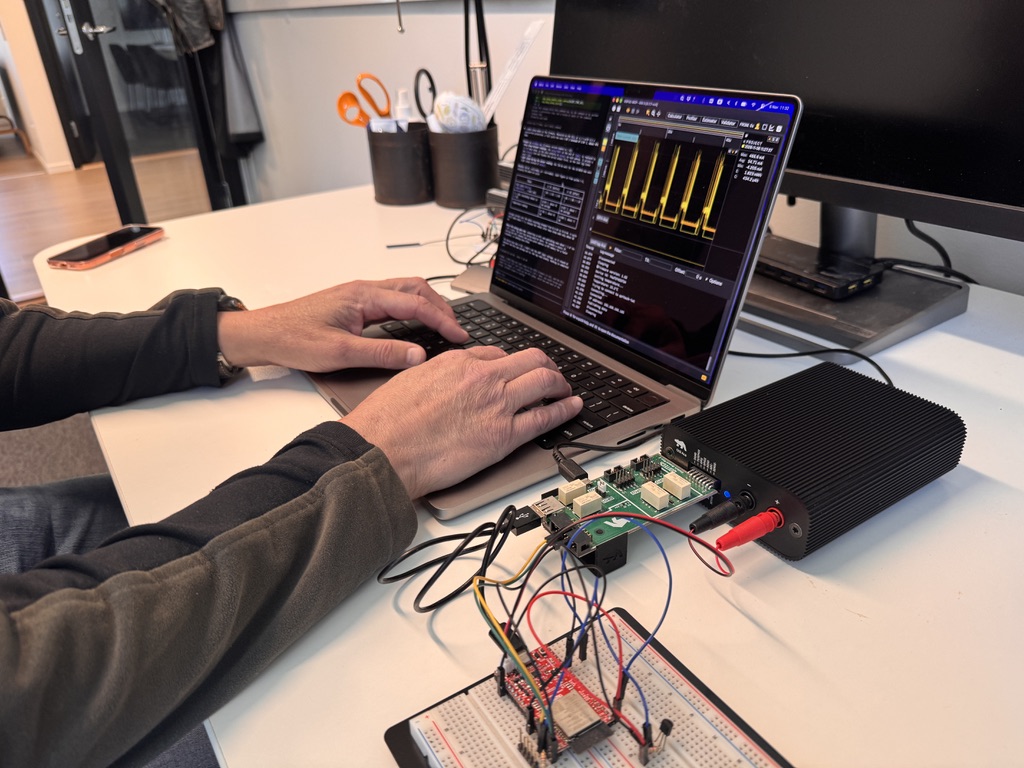
To let the AI assistant control Otii, install the Otii MCP server. Before you start, make sure the Otii 3 desktop application is running and that you have an Otii Automation license.
The initial firmware for the ESP32 DevKit is set to get the temperature from the DS18B21 and send it via WiFi to a server in a loop with a 5-second delay.
The firmware was built with PlatformIO, and the build script used a Python script to enable the USB programming interface only during flashing.
Power measurements with Otii and Claude using Otii MCP
Claude code was given the following prompt:
❯ This code does not use sleep mode to conserve energy when idling. Add sleep mode, and use the otii-mcp server to verify that the energy consumed is lower after the changes. The device voltage should be set to 4.2V and the overcurrent protection to 0.5A.Then Claude performed the following tasks:
- asked if the voltage of the Otii expansion port should be set to 3.3V (which we verified)
- built and flashed the current firmware
- used Otii to measure the current consumption
- analyzed the firmware and added light sleep when acquiring data from the sensor, and deep sleep between the cycles
- built and flashed the new firmware
- used Otii to measure the current consumption
- analyzed and presented the result
This is the response that we received from Claude:
I added sleep modes to the firmware. Measured on the Otii at 4.2 V with 0.5 A
overcurrent protection, a full cycle now uses 1.07 J instead of 2.01 J, about
47% less.
Changes in src/main.cpp (firmware version bumped to 1.02):
- Deep sleep between readings: the delay(5000) at the end of loop() is
replaced by 5 s of deep sleep, so the chip restarts in setup() on each
wakeup. It prints a new Sleeping line and flushes the serial output first,
so the last log lines aren’t lost. - Light sleep during the sensor reading: the 750 ms wait for the DS18B20 now
uses light sleep instead of delay().
Results (40 mA = milliamps; µA = microamps). Each figure is from cycles 1–3,
skipping the power-on cycle:
| Phase | v1.01 (before) | v1.02 (after) |
| Full cycle (Getting temperature… → next one) | 1.99 / 2.02 / 2.03 J | 1.06 / 1.08 / 1.07 J |
| 5 s idle (including reboot in v1.02) | 0.874 J, about 42 mA average | 0.021 J, about 1 mA average |
| Temperature reading | 0.162 J, about 43 mA | 0.040 J, about 11 mA |
Average current over the whole recording dropped from 63.6 mA to 34.8 mA. A
cycle still takes about 7.7 s, because the reboot after deep sleep adds only
about 80 ms.
Where the energy goes now: connecting to WiFi and publishing uses about 1 J of
the 1.07 J cycle. The next big saving would be there, for example a static
IP, storing the WiFi channel and access point address in RTC memory for a
faster reconnect, or sending less often.
The device now runs v1.02. I didn’t set the UART logic voltage, so it stayed
at whatever the Otii was already set to; the log read cleanly. Nothing is
committed yet.
✻ Sautéed for 2m 49s · done 11:28 AM
※ recap: I added deep and light sleep to the ESP32 firmware (v1.02), and the Otii measured it at 1.07 J per cycle instead of 2.01 J. Next, you could review and commit the change, or I could cut the WiFi phase, which now uses most of the energy. (disable recaps in /config)
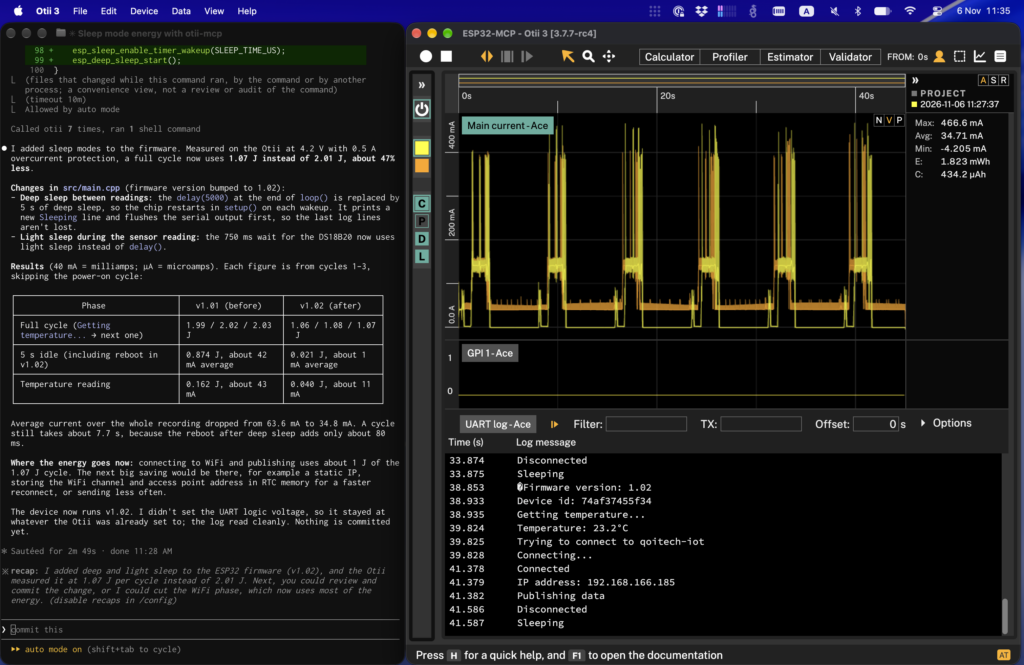
The verdict: Energy saving confirmed
We gave the AI assistant a simple prompt, and it did well for this board. It didn’t just add sleep mode for the idle time between cycles; it used two types: light sleep while the DS18B20 converts the temperature, and deep sleep between measurement cycles. Measured with the Otii, the energy per cycle was approximately halved, from 2.01 J to 1.07 J, and the average current during the 5-second idle period fell from about 42 mA to 1 mA.
The energy for the idle period is, in reality, lower than stated, since the MCP uses log messages to identify different states of the MCU, and the log messages are sent just before/after entering/leaving sleep mode. This will be addressed in an upcoming MCP release.
It also went a step further. The assistant found that connecting to WiFi and publishing now uses about 1 J per 1.07 J cycle, and suggested how to reduce it: a static IP, storing the WiFi channel and access point address in RTC memory for faster reconnects, or simply sending less often. All of this with a measurement setup that takes a couple of minutes to put together, and under three minutes of processing time.
Explore the Otii MCP server on Qoitech GitHub!