How much does NTN connectivity for IoT cost in energy?
How much does NTN connectivity for IoT cost in energy?
NTN, Non-Terrestrial Network, gets a lot of attention in the IoT space right now, and for good reason. Think of wildfire sensors deep in a forest, offshore monitoring buoys, or remote pipeline sensors where there is simply no cellular coverage. For those deployments, satellite connectivity is the only option. But what is the real energy cost of going via a satellite instead of a ground-based base station? That is exactly what this article tests and discusses.
This is the third article in our series on power consumption with the Nordic nRF9151. The two previous articles looked at PSM and eDRX on the terrestrial side:
- Measuring LTE Power Save Modes on Nordic nRF9151-DK
- Performance of LTE Power Save Modes on Nordic’s nRF9151-DK
This article picks up where those left off, but now adds a satellite path to compare against.
The NTN and cellular connectivity setup
For the terrestrial network we used Soracom, a global IoT connectivity provider. For the NTN connectivity we used Monogoto, which routes traffic via the Skylo IoT satellite service operating on S-band (Band 256). The satellite is a GEO satellite in a fixed position above the equator, meaning that from our location in Lund, Sweden, it sits roughly 30° above the southern horizon. A clear view to the south is therefore essential for a reliable connection.
To keep the comparison as fair as possible, we used two identical nRF9151-SMA-DK boards running the same firmware — the only difference between them being the SIM card and the configured connectivity mode. Both boards were flashed with modem firmware mfw_nrf9151-ntn_1.0.0 and the SLM application nrf9151dk_serial_modem_v1.0.0.hex (from ncs-serial-modem v1.0.0 / NCS 3.2.2). Using the SLM application gives us full control over the AT command sequence, which is valuable for a controlled measurement.
Both boards were connected to Otii Ace Pro units for measurement and control:
- The nRF9151 power rail is connected to the Otii Ace Pro main channel (banana connectors) — this is the path we measure.
- A separate 5 V supply from the Otii Ace Pro 0–15 V pin (with DGND) powers the rest of the nRF9151-SMA-DK board, which needs power but is not part of what we want to measure.
- UART TX and RX are connected to the Otii Ace Pro UART, enabling us to both monitor AT command output and control the boards programmatically.
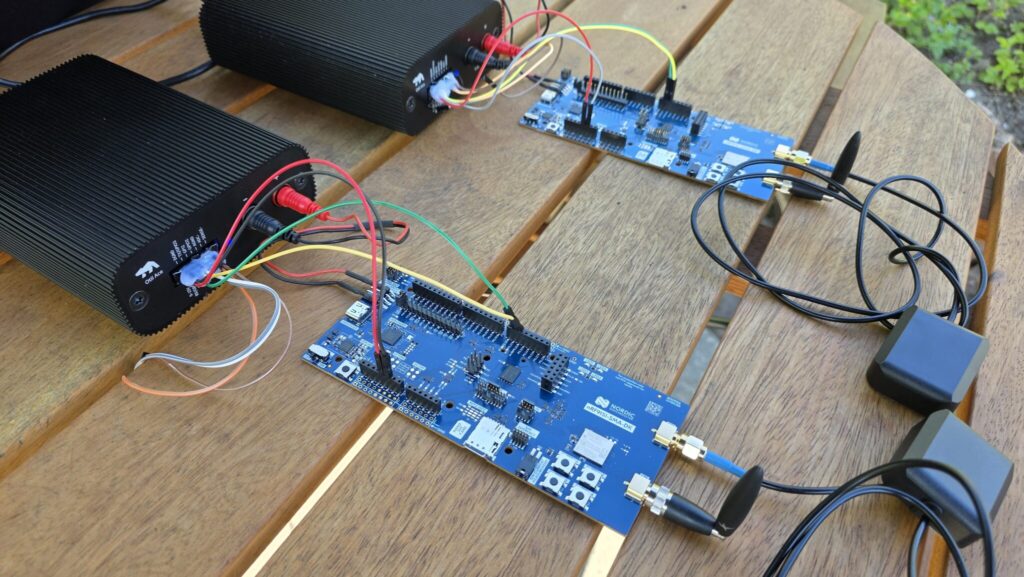
One thing to be aware of: with the SLM application running, the UART block is always active, which adds a baseline of just under 600 µA to all current readings. This was characterised in the two previous articles. In a real product, the application runs directly on the modem and there is no UART overhead — so for real-world comparisons and absolute values to calculate battery budget, roughly 600 µA should be subtracted from all values. We will show both the measured values as well as the compensated values.
Both boards were configured with PSM using a 1-hour TAU timer and a 2-minute active window.
Because the GEO satellite is positioned above the equator, we had to go outdoors and find a location with an unobstructed view to the south — the satellite appears at roughly 30° elevation from Lund. Indoor or north-facing environments will not work.
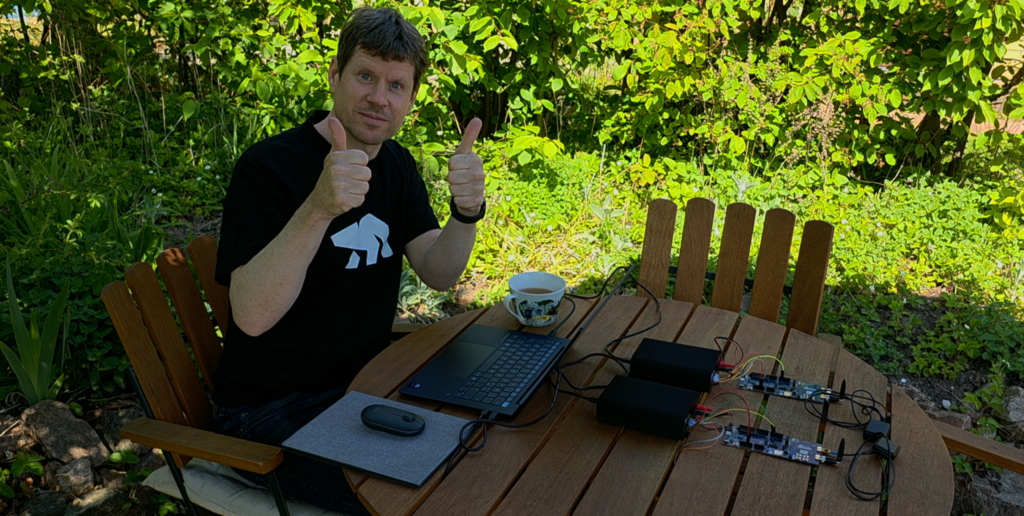
To verify that data was actually reaching the intended destination, we set up a UDP server and sent short messages from each board.
To keep the AT command sequences manageable, we wrote a small Python script to automate the procedure — but everything it does could equally be sent manually in Otii desktop application terminal.
The script handled:
- Powering on and initialising both boards
- Acquiring a GNSS fix and waiting for a confirmed location
- Enabling NTN or terrestrial registration and waiting for full attachment
- Sending a UDP payload
- Entering PSM sleep
Python script available here. An active Automation Toolbox license is required to run it.
#!/usr/bin/env python3
'''
Otii 3 NTN vs Terrestrial communication

If you want the script to login and reserve a license automatically
add a configuration file called credentials.json in the current folder
using the following format:

    {
        "username": "YOUR USERNAME",
        "password": "YOUR PASSWORD"
    }

'''
import time
import os
from otii_tcp_client import otii_client
from datetime import datetime

PROJECT_FOLDER = os.path.join(os.getcwd(), 'NTN_vs_Terrestrial')

class AppException(Exception):
    '''Application Exception'''

def get_devices(otii):
    devices = otii.get_devices()
    if len(devices) == 0:
        raise AppException('No Ace devices connected!')

    device_NTN = None
    device_Terr = None

    for device in devices:
        if device.name == 'Ace_NTN':
            device_NTN = device
        elif device.name == 'Ace_Terrestrial':
            device_Terr = device

    if device_NTN is None and device_Terr is None:
        raise AppException('No Ace_NTN or Ace_Terrestrial found!')

    return device_NTN, device_Terr

def setup_device(device):
    device.set_main_voltage(3.6)
    device.set_exp_voltage(1.8)
    device.set_max_current(1)
    device.enable_5v(5)
    for channel in ['mc', 'mp']:
        device.enable_channel(channel, True)
        device.set_channel_samplerate(channel, 1000)
    device.enable_channel('rx', True)
    device.set_uart_baudrate(115200)

def cleanup(device, project):
    device.enable_5v(0)
    device.set_main(False)
    try:
        project.stop_recording()
    except:
        pass

def send(project, device, message, OK_text, error_text):
    ''' Wait for message on UART from one device or a list of devices.
        Returns a bool (single device) or dict of {device.id: bool} (list). '''
    recording = project.get_last_recording()
    devices = device if isinstance(device, list) else [device]
    for device in devices:
        device.write_tx(message + '\r\n')
    previous_samples = {d.id: recording.get_channel_data_count(d.id, 'rx') for d in devices}
    error_message = {d.id: False for d in devices}
    found_message = {d.id: False for d in devices}
    last_value = {d.id: None for d in devices}

    while not all(found_message.values()):
        time.sleep(0.1)

        for d in devices:
            if found_message[d.id]:
                continue

            samples = recording.get_channel_data_count(d.id, 'rx')

            if samples > previous_samples[d.id]:
                rx_data = recording.get_channel_data(d.id, 'rx',
                                                     previous_samples[d.id],
                                                     samples - previous_samples[d.id])
                for data in rx_data['values']:
                    if error_text in data['value']:
                        print('Found error message: {}'.format(data['value']))
                        error_message[d.id] = True
                        found_message[d.id] = True
                        last_value[d.id] = data['value']
                        break
                    elif OK_text in data['value']:
                        print('Found OK message: {}'.format(data['value']))
                        found_message[d.id] = True
                        last_value[d.id] = data['value']
                        break
                previous_samples[d.id] = samples
    if isinstance(device, list):
        return last_value
    else:
        return last_value[devices[0].id]

def NTN_Terestrial(otii):
    device_NTN, device_Terr = get_devices(otii)
    devices = [d for d in [device_NTN, device_Terr] if d is not None]

    project = otii.get_active_project()
    project.save_as(PROJECT_FOLDER)

    for device in devices:
        setup_device(device)

    project.start_recording()
    recording = project.get_last_recording()

    for device in devices:
        device.set_main(True)
    send(project, devices, '', 'Ready', 'ERROR')
    send(project, devices, 'ATE1', 'OK', 'ERROR') # Turn on echo

    while True:
        key = input('\nWhat do you want to do?\n'
            '  1: Get GNSS fix (both)\n'
            '  2: Set up devices\n'
            '  3: Connect Terrestrial\n'
            '  4: Connect NTN\n'
            '  5: Just send Terrestrial data\n'
            '  6: Just send NTN data\n'
            '  Q: Quit\n'
            '> ')
        key = key.strip()

        if key == '1':
            # Get GNSS fix (both)
#            send(project, devices, 'AT+CFUN=4', 'OK', 'ERROR')
            send(project, devices, 'AT+CFUN=0', 'OK', 'ERROR') # Try if this works as good as 4
            send(project, devices, 'AT%XSYSTEMMODE=0,0,1,0,0', 'OK', 'ERROR')
            send(project, devices, 'AT+CFUN=1', 'OK', 'ERROR')
            send(project, devices, 'AT#XGNSS=1,0,0,0', '#XGNSS: 1,1', 'ERROR')
            # wait for message like #XGNSS: 55.725886,13.170725,67.409645,28.614084,0.101129,0.000000,"2026-05-04 11:36:18"
            location = send(project, devices, '', '#XGNSS: 5', 'ERROR')
            if isinstance(location, list):
                location = location[0][8:].split(',')
            else:
                location = location[8:].split(',')
            print(f'\nlat: {location[0]}, long: {location[1]}, elevation: {location[2]}\n')
            send(project, devices, 'AT#XGNSS=0', 'OK', 'ERROR')
            send(project, devices, 'AT+CFUN=0', 'OK', 'ERROR')

        elif key == '2':
            # Set up devices
            if device_NTN is not None:
                send(project, device_NTN, 'AT%XSYSTEMMODE=0,0,0,0,1', 'OK', 'ERROR')
                send(project, device_NTN, 'AT%XBANDLOCK=2,,"23,255,256"', 'OK', 'ERROR')
                send(project, device_NTN, f'AT%LOCATION=2,"{location[0]}","{location[1]}","{location[2]}",0,0', 'OK', 'ERROR')
                send(project, device_NTN, 'AT+CGDCONT=0,"IP","data.mono"', 'OK', 'ERROR')
            if device_Terr is not None:
                send(project, device_Terr, 'AT%XSYSTEMMODE=0,1,0,0,0', 'OK', 'ERROR')
                send(project, device_Terr, 'AT%XBANDLOCK=0', 'OK', 'ERROR')
                send(project, device_Terr, 'AT+CGDCONT=0,"IP","soracom.io"', 'OK', 'ERROR')

            send(project, devices, 'AT+CPSMS=1,"00100001","00000001"', 'OK', 'ERROR')
            send(project, devices, 'AT+CEREG=5', 'OK', 'ERROR')
            send(project, devices, 'AT%MDMEV=2', 'OK', 'ERROR')
            send(project, devices, 'AT+CNEC=24', 'OK', 'ERROR')
            send(project, devices, 'AT+CSCON=3', 'OK', 'ERROR')

        elif key == '3':
            # Connect Terrestrial
            if device_Terr is None:
                print('Ace_Terrestrial is not connected, skipping.')
            else:
                send(project, device_Terr, 'AT+CFUN=1', 'OK', 'ERROR')
                send(project, device_Terr, '', '+CEREG: 5,', 'ERROR')
                send(project, device_Terr, 'AT+CEREG?', 'OK', 'ERROR')

        elif key == '4':
            # Connect NTN
            if device_NTN is None:
                print('Ace_NTN is not connected, skipping.')
            else:
                send(project, device_NTN, 'AT+CFUN=1', 'OK', 'ERROR')
                send(project, device_NTN, '', '+CSCON: 1,7,4', 'ERROR')
                send(project, device_NTN, 'AT+CEREG?', 'OK', 'ERROR')

        elif key == '5':
            # Just send Terrestrial data
            if device_Terr is None:
                print('Ace_Terrestrial is not connected, skipping.')
            else:
                send(project, device_Terr, 'AT#XSOCKET=1,2,0', '#XSOCKET:', 'ERROR')
                send(project, device_Terr, 'AT#XSENDTO=0,0,0,"37.27.2.53",5005,"Hello from Soracom on ground"', '#XSENDTO', 'ERROR')
                send(project, device_Terr, 'AT#XCLOSE=0', 'OK', 'ERROR')

        elif key == '6':
            # Just send NTN data
            if device_NTN is None:
                print('Ace_NTN is not connected, skipping.')
            else:
                send(project, device_NTN, 'AT#XSOCKET=1,2,0', '#XSOCKET:', 'ERROR')
                send(project, device_NTN, 'AT#XSENDTO=0,0,0,"37.27.2.53",5005,"Hello from Monogoto in space"', '#XSENDTO', 'ERROR')
                send(project, device_NTN, 'AT#XCLOSE=0', 'OK', 'ERROR')
        elif key.lower() == 'q':
            break

    for device in devices:
        cleanup(device, project)

def main():
    '''Connect to the Otii 3 application and run the measurement'''
    client = otii_client.OtiiClient()
    with client.connect() as otii:
        NTN_Terestrial(otii)

if __name__ == '__main__':
    main()
The measurements
The comparison is broken into three phases: GNSS fix, network registration, and data transmission.
GNSS fix
Getting a GNSS fix is only strictly required for the NTN path — the modem needs to know its location to determine which satellite to connect to. For terrestrial IoT, this step would normally be skipped entirely. We included it here as a separate, clearly isolated phase so that the cost is visible.
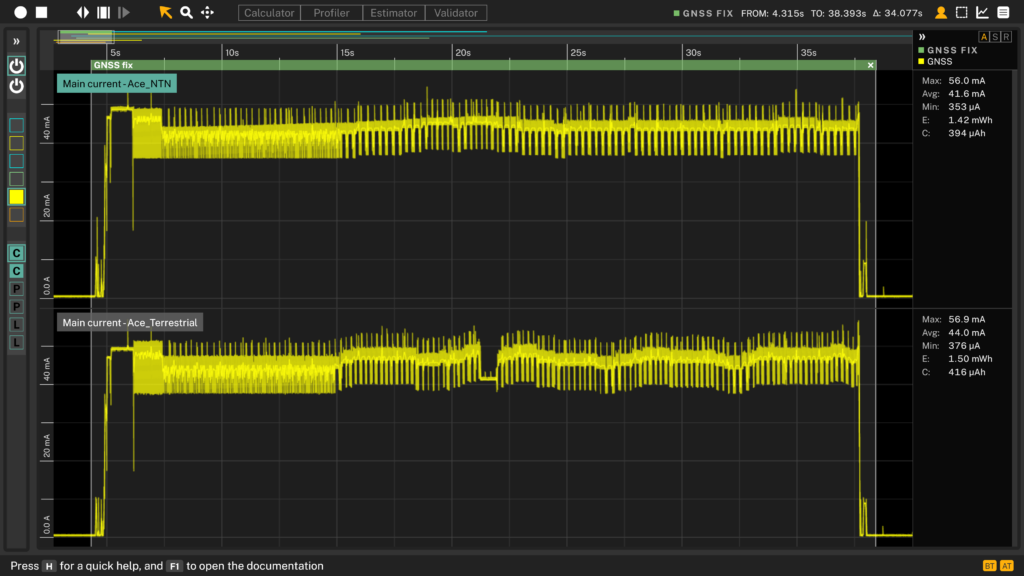
In this test the GNSS fix took approximately 34 seconds and consumed between 1.4 and 1.5 mWh. This is a one-time cost per wake cycle for the NTN board, and has no equivalent on the terrestrial side. If we compensate for the UART consumption, we will get in average 1.4 mWh
Network registration
After the GNSS fix, both boards were configured — one for NTN with PSM, one for terrestrial NB-IoT with PSM — and the radio was switched on to begin network registration.
The terrestrial registration via Soracom was fast and unremarkable:
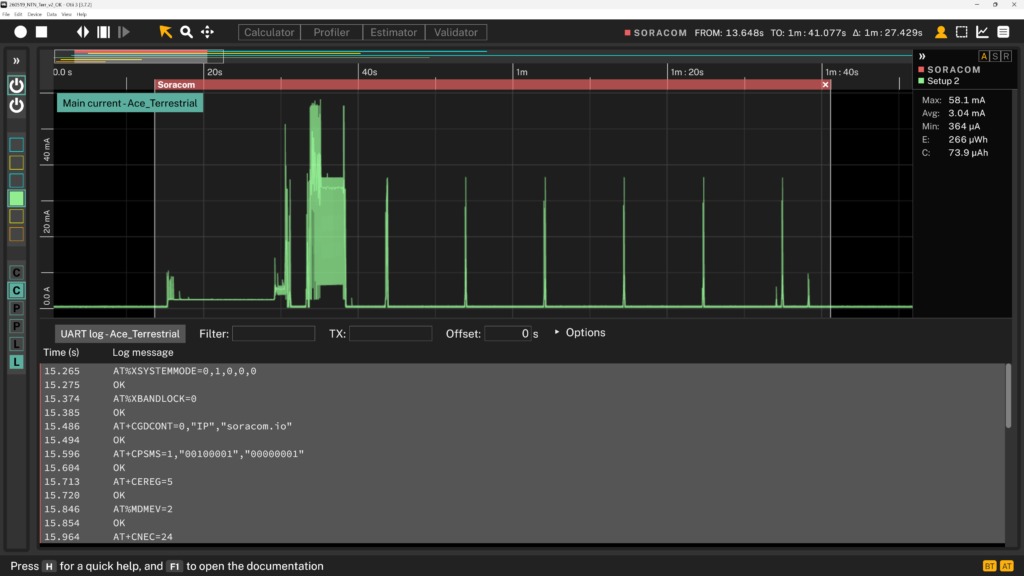
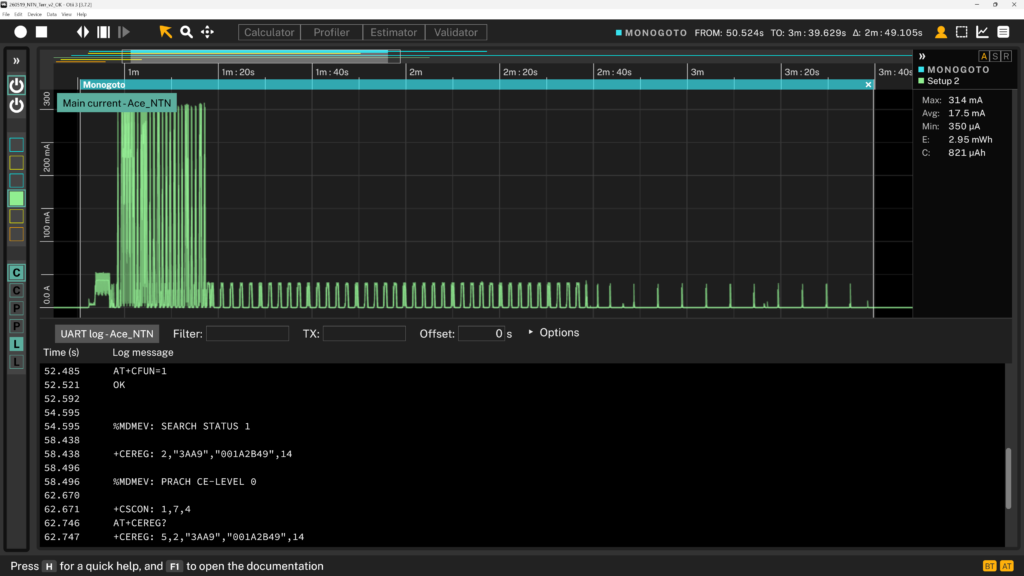
The NTN registration via Monogoto/Skylo looked noticeably different:
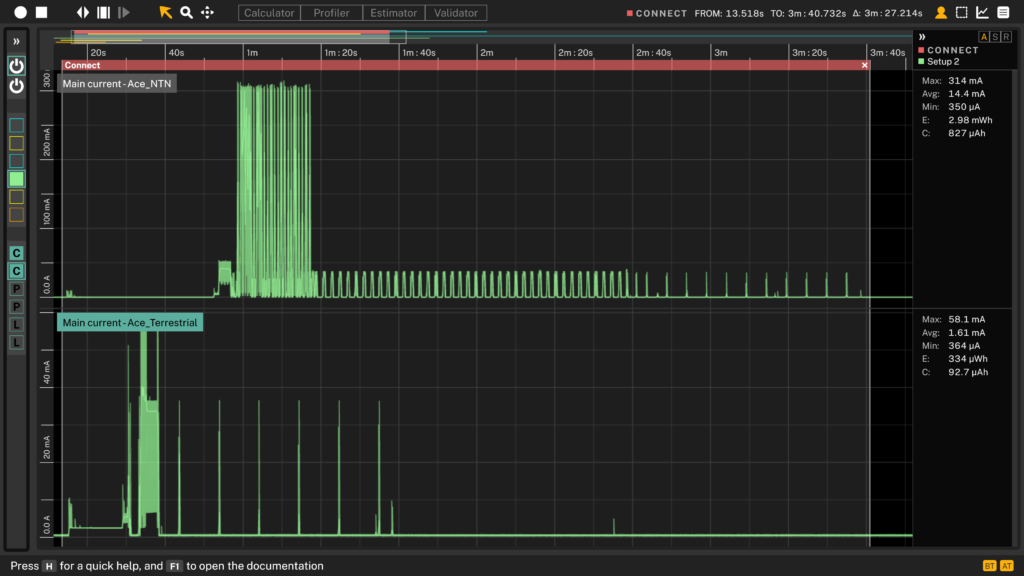
And side by side the difference is striking:
| Energy | Compensated | |
|---|---|---|
| Terrestrial (Soracom, NB-IoT) | 266 µWh | 213 µWh |
| Skylo/GEO NTN (Monogoto, S-band 256) | 2.95 mWh | 2.85 mWh |
The Skylo/GEO NTN registration cost more than 13× the energy of the terrestrial equivalent.
Important note: This is a 1:1 comparison that does not account for use case differences and setup variations in data transmission across these connectivity options. In practice, NTN deployments typically optimize transmission by batching data—for example, sending once per day rather than hourly—which significantly reduces power consumption and brings performance closer to hourly terrestrial transmission. See our upcoming article for a detailed comparison of battery selection and lifetime estimation for NTN and terrestrial applications.
Data transmission
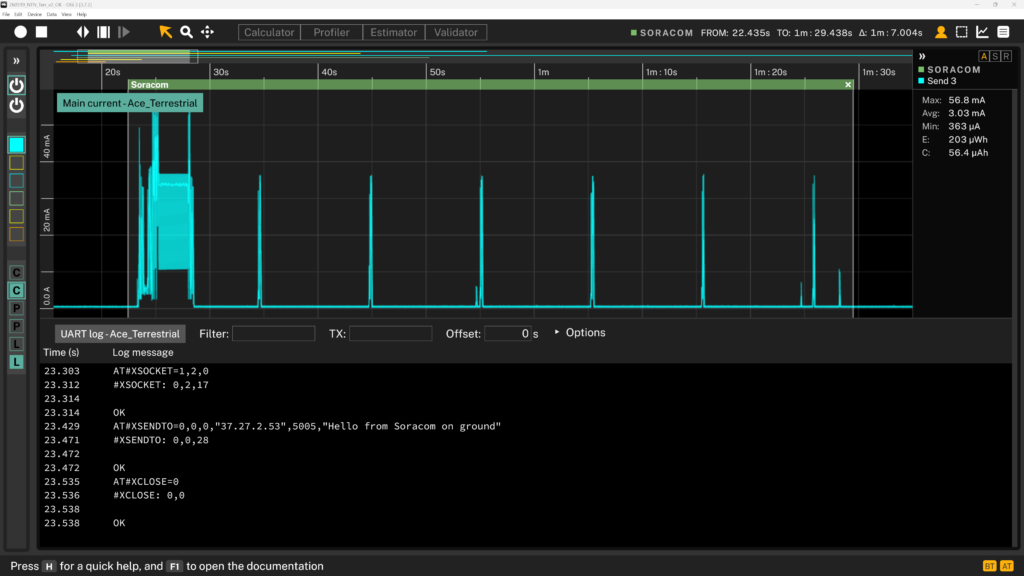
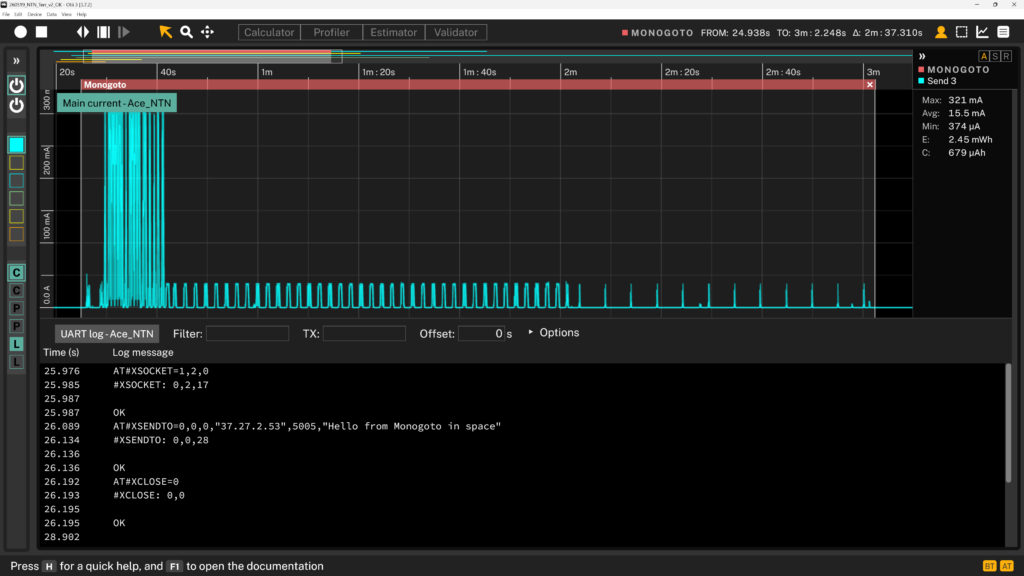
With both boards registered, we sent a UDP packet to our server. The terrestrial board sent “Hello from Soracom on ground” and the NTN board sent “Hello from Monogoto in space” — both 28 characters.
| Energy | Compensated | |
|---|---|---|
| Terrestrial (Soracom, NB-IoT) | 203 µWh | 163 µWh |
| Skylo/GEO NTN (Monogoto, S-band 256) | 2.45 mWh | 2.35 mWh |
Again roughly 14× higher for the Skylo/GEO NTN path. It is also worth noting that during NTN transmission the current peaks reach several hundred milliamps. With a sample rate of 1000 samples per second, the actual peak currents are likely even higher than what the statistics show — important to keep in mind when sizing your energy storage and power source.
How much does NTN connectivity cost in energy?
| Phase | Terrestrial | Skylo/GEO NTN (Satellite) | Ratio |
|---|---|---|---|
| GNSS fix | — (not required) | ~1.40 mWh | — |
| Network registration | 213 µWh | 2.85 mWh | ~13× |
| Data transmission (28 bytes) | 163 µWh | 2.35 mWh | ~14× |
The results confirm what the physics would predict. A GEO satellite sits approximately 35,800 km above the equator. Transmitting to a target that far away requires significantly more power than reaching a ground station a few kilometres away, and the link setup takes longer due to the propagation delay and the more complex handshaking the NTN standard requires.
Does this mean NTN connectivity is not worth using? Not at all. If your devices operate in areas with no cellular coverage — remote forests, open sea, mountain regions — then NTN is the only viable option, and the energy cost is simply a design constraint to accommodate. Long PSM sleep periods between transmissions will keep the average power budget manageable even with the higher per-transmission cost, which can be further optimized by adjusting transmission frequency.
What the numbers here do tell you is that the energy storage in an NTN device needs to be sized to handle the peak currents during transmission, and that the battery life calculation must account for the GNSS fix and registration costs on every wake cycle, not just the payload transmission itself.
One aspect not covered here is the subscription cost difference between NTN and terrestrial connectivity — that is a separate topic worth evaluating for any deployment, but outside the scope of this power measurement article.
Bonus: Download the Otii project here and analyze the measurements yourself. No Otii instrument is required; just open the project in the Otii Desktop App to inspect the current traces and energy results.
All measurements were made with the Otii Ace Pro. Boards: nRF9151-SMA-DK × 2. Modem firmware: mfw_nrf9151-ntn_1.0.0. Application firmware: nrf9151dk_serial_modem_v1.0.0.hex. Location: Lund, Sweden, outdoors with clear southern sky view.